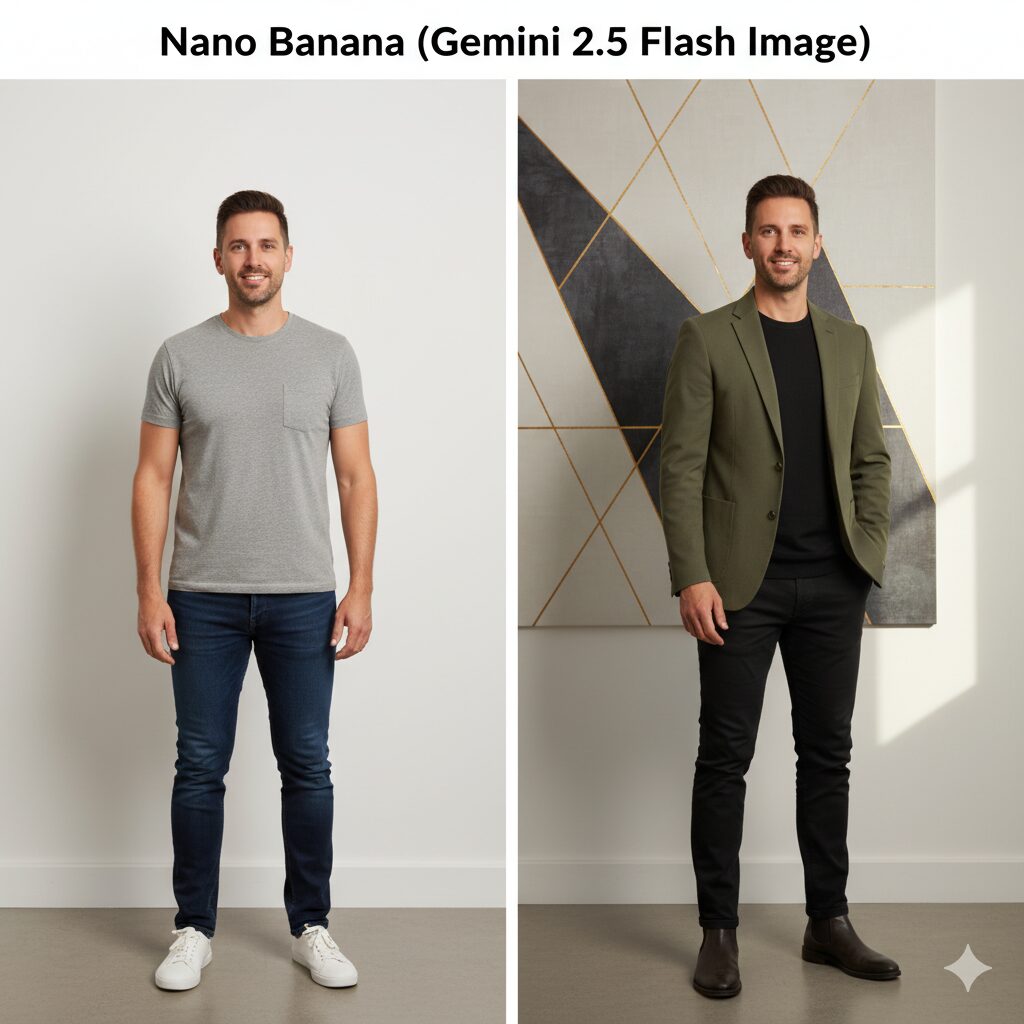
AI image tools are evolving quickly, and one of the most talked about releases this year is Google DeepMind’s “Nano Banana.” Behind the playful name is a serious upgrade in how creators and businesses can generate and edit images.
If you’ve seen the recent wave of 3D figurine-style portraits making the rounds online, chances are they were made with this model.
Let’s break down what Nano Banana actually is, how it works, and whether it’s worth adding to your toolkit. The focus is on practical value: how it can help you produce consistent visuals, save editing time, and deliver more professional results without having to learn complicated software.
What is Nano Banana?
Nano Banana is the nickname given to Gemini 2.5 Flash Image, Google’s latest image generation and editing model built by DeepMind. Unlike earlier AI models that mainly focused on single prompts with mixed results, Nano Banana is designed to give you much more control and consistency.
At its core, it’s an image model that allows you to do two things really well:
- Generate new visuals from text prompts, whether that’s a portrait, a product mockup, or a creative concept. To demonstrates what Nano Banana produces from a simple text prompt, i asked it to “Generate a realistic portrait of a young woman sitting in a café with natural morning light.”

- Edit existing images with precision, making changes to specific parts of a photo without distorting everything else.
What sets Nano Banana apart is its ability to maintain character likeness across different edits and scenes. For example, if you upload a photo of yourself and ask it to generate several variations – different outfits, backgrounds, or poses – it does a better job of keeping you recognizable than most alternatives on the market.
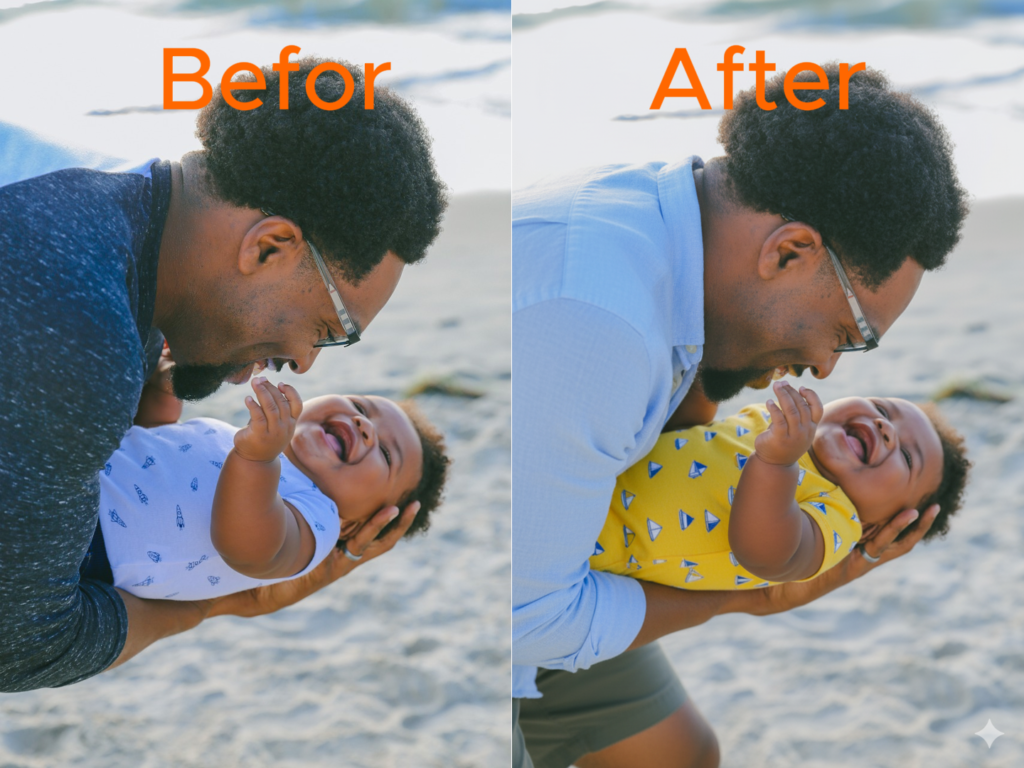
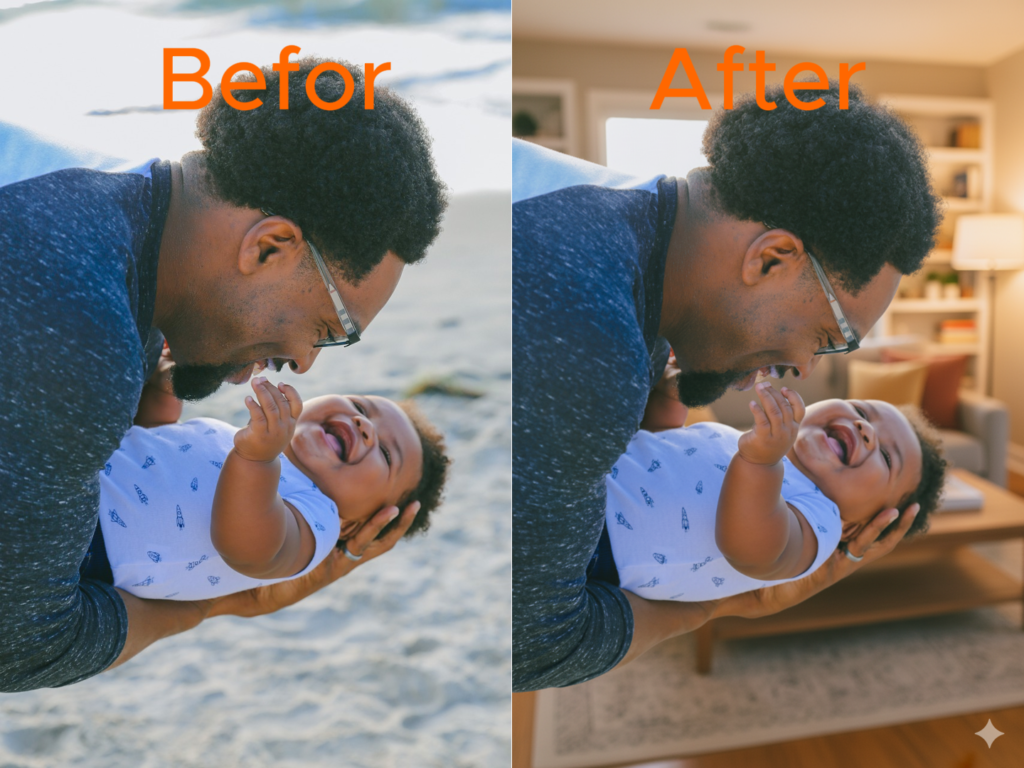
I uploaded a photo of “A father holding his baby in a beach background.” and I asked for these edits.
- Outfit Change: “Using the provided photo of a father holding his baby above, preserve their faces and natural likeness. Keep their expressions the same, but change their outfits into casual summer clothing.”
- Background Change: “Using the provided photo of a father holding his baby above, preserve their faces and natural likeness. Keep the pose and clothing the same, but replace the beach background with a cozy living room.”
- Pose Change: “Using the provided photo of a father holding his baby above, preserve their faces and natural likeness. Keep the outfits the same, but vary their pose so the father is holding the baby above his head with both smiling.”
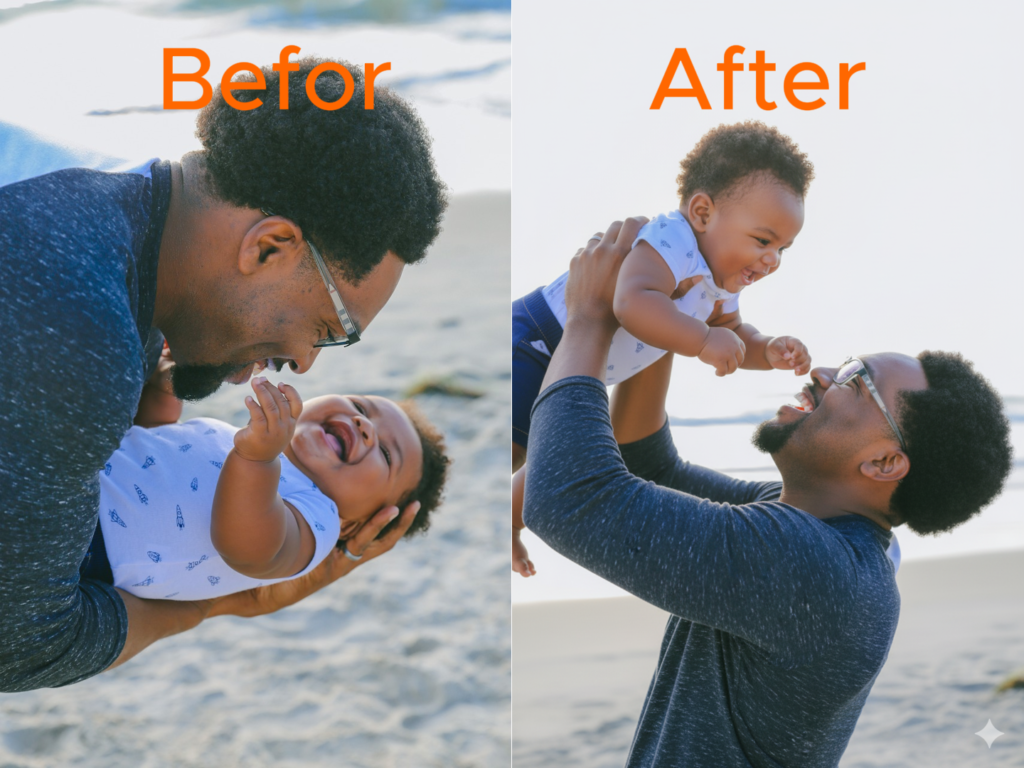
From the results, their faces and natural likeness, expressions, pose, clothing and outfits were preserved throughout.
This consistency is why it’s gone viral with the 3D figurine trend. People are using it to create stylized miniature versions of themselves or their pets while still keeping the likeness intact.
It’s also practical beyond trends. A business owner, for instance, can use Nano Banana to create a series of branded visuals where the main character or product looks the same across different campaigns. That saves money on photo shoots and keeps your brand image sharp.
What is a Nano Banana Model?
When people talk about a “Nano Banana model,” they’re referring to the underlying technology: an AI image generation and editing model created by Google DeepMind. This isn’t just another text-to-image tool. It’s designed to handle both new image creation and precise modifications of existing images.
What makes the model different is how it balances creativity with control. Many image generators can produce impressive results, but they often struggle when you want to keep a person, product, or brand element consistent across multiple variations. The Nano Banana model was trained to prioritize that consistency.
For example, if a fashion retailer wants to create a seasonal catalog, they can use the same product photo as a base and generate different styled backgrounds without losing the product’s exact shape and texture. Or if a content creator wants to appear in different settings – on stage, outdoors, in a studio – they can prompt the model without worrying that their face will look noticeably altered each time.
At its core, the Nano Banana model is about reducing the unpredictability that frustrates many users of AI art tools. It gives you visuals that are not only imaginative but also usable in real-world projects where accuracy matters.
How to Use Nano Banana Gemini
There are two main ways to use Nano Banana, depending on who you are and what you need.
For everyday creators: The simplest route is through the Gemini app. Here, you can enter a prompt, upload a photo, and start experimenting with edits. The app is built to be straightforward, so you don’t need technical experience. This is where most people are creating the 3D figurine portraits that have become so popular.
For developers and businesses: If you need more control or want to scale your usage, you can access Nano Banana through Google AI Studio or Vertex AI. These platforms allow you to integrate the model into your workflows, automate bulk edits, or plug image generation into a larger application.
Using Nano Banana usually follows a simple flow:
- Select the model (Gemini 2.5 Flash Image).
- Upload your base photo or start with a text prompt.
- Describe what you want changed or created in natural language.
- Review the output, refine with another prompt if needed, and export the final image.
What makes this process effective is the model’s ability to follow natural instructions. You don’t need to learn complex prompt engineering. Clear descriptions like “make this look like a figurine” or “replace the background with a beach” generally produce strong results.
Is Nano Banana Free to Use?
The short answer is partly yes. Google currently offers access to Nano Banana inside the Gemini app with a free tier, but there are daily usage caps on how many images you can generate. Which includes:
- 100 AI-generated images per day.
- 5 text prompts per day.
This free option is enough if you’re experimenting or creating personal projects.
For heavier use especially if you want to integrate the model into your workflows, you’ll need a paid plan. Through Google’s AI Studio or Vertex AI, Nano Banana is priced on a usage basis, with costs averaging around a few cents per image generated. For businesses, this is still cost-effective compared to commissioning repeated edits or photo shoots.
The free tier is a great way to test the model and see if it fits your needs, but if you’re planning to build a brand campaign or produce large volumes of content, the paid option is where the real value lies. It gives you higher limits, API access, and the ability to scale without interruptions.
Key Features at a Glance
Nano Banana was built to reduce the frustration people often feel with AI image tools. Three features stand out:
Editing precision – You can adjust only what you want changed in a photo while keeping everything else intact. For example, swapping a background without altering facial details. Just like in the example we had earlier.
Character consistency – The model maintains likeness across different edits and scenes. This makes it reliable for campaigns or personal projects where you need the same person or product to appear in multiple variations.
Watermarking and safety – Every image is tagged with SynthID, Google’s invisible watermarking technology. This ensures transparency while protecting against misuse. You’ll also see a visible “AI-generated” marker on outputs, which builds trust when sharing content publicly.
Performance and Image Quality
Nano Banana currently produces images at a maximum resolution of about 1024×1024 pixels. That’s more than enough for social media, websites, and digital marketing campaigns, though not ideal for large-scale print projects.
Its biggest strengths are:
- Portraits – It keeps faces recognizable even across multiple edits. This you will see with the photo of “A father holding his baby in a beach background.” which we used to play around above
- Product mockups – Items retain their shape and texture while backgrounds or styles change. You will also notice this with the photo of “A father holding his baby in a beach background.” above and the three changes we asked for.
- The figurine effect – The viral 3D miniature style works consistently because the model preserves likeness while adding the stylized depth and materials. Here is an example below.
I asked Nano Banana to “Turn this person into a stylized 3D figurine standing on a display base, keeping the face recognizable.” and below is the result.

The weaknesses are typical for AI image models today. Complex details like hands, small text, or busy backgrounds can still produce artifacts. The resolution ceiling also limits print applications, though this will likely improve with future updates.
Pricing, Speed, and Limits
If you’re using Nano Banana inside the Gemini app on the free plan, you can generate up to 100 images per day. Once you reach that limit, you’ll need to wait until the next day or upgrade to a paid plan. Free users are also limited to just 5 prompts per day when using the Gemini 2.5 Pro model, which makes the free tier best suited for light personal use or experimentation.
For paid subscribers, the caps are much higher. The Gemini Advanced plan allows up to 1,000 image generations per day, along with expanded prompt limits. This makes it far more practical if you’re producing content regularly or working on campaigns where volume matters.
Developers and businesses can also access Nano Banana through Google AI Studio and Vertex AI. Pricing here is usage-based, with each 1024×1024 image costing about $0.039. At that rate, generating hundreds of branded images still comes out significantly cheaper than commissioning repeated photo shoots or manual edits.
In terms of performance, most images are generated within a few seconds, making it easy to refine prompts and test variations in real time. For those integrating through the API, Google enforces request and token rate limits, but these can be scaled up by moving to higher plan tiers.
Nano Banana vs Alternatives
No image model exists in isolation. Here’s how Nano Banana compares to leading competitors:
Midjourney – Known for its artistic flair and stylized visuals. It’s excellent for creative projects but less consistent when you need the same character or product across variations.
OpenAI image tools – Integrated directly into ChatGPT, making them convenient for quick edits. They perform well for realism but offer less control over targeted editing.
Runway and Adobe Firefly – Strong choices if you’re working with video or want tight integration into design software. Adobe in particular is valuable if you already use Creative Cloud, though its image generation isn’t as consistent with likeness preservation.
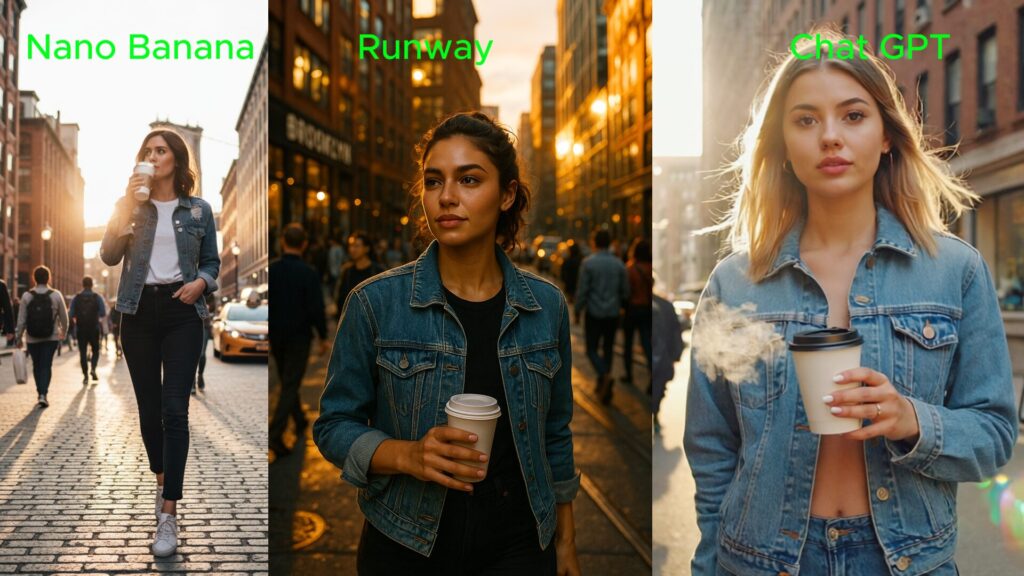
Nano Banana’s sweet spot is consistency and control. While Midjourney may give you a more artistic flair, and Adobe ties neatly into existing workflows, Nano Banana is the model you reach for when you need repeatable, reliable visuals.
Who Should Use Nano Banana
Creators – Ideal for social content, profile images, or creative projects where you need quick, polished visuals without complex editing tools.
Marketers – Perfect for building persona-consistent campaigns where the same character or product needs to appear in multiple formats.
Developers – With API access, you can batch-generate images or integrate them directly into apps and workflows, saving time on repetitive design tasks.
Rating Table
| Category | Score (out of 5) | Notes |
| Quality | 4.5 | Strong results, though occasional artifacts in hands and text remain |
| Speed | 4.5 | Fast response time for both casual and API use |
| Control | 4.5 | Excellent at targeted edits and preserving likeness |
| Price | 4.0 | Free tier is limited, but paid usage is affordable |
| Ecosystem | 4.0 | Strong integration with Google tools, though resolution limits exist |
Overall rating: 4.3 / 5
Nano Banana is already one of the most reliable AI image models available for digital projects. It shines when you need consistency, speed, and simple controls, and it will only get stronger as Google improves resolution and expands its ecosystem.
My Verdict
Nano Banana, or Gemini 2.5 Flash Image, is more than just a trending tool behind the 3D figurine craze. It represents a serious step forward in AI-powered image creation and editing. What makes it stand out is the ability to keep characters and objects consistent across multiple outputs, something that saves time and produces results you can actually use in real projects.
Like any new model, it isn’t perfect. The current resolution ceiling of about 1024×1024 pixels may limit its use for print or high-resolution campaigns, and you’ll occasionally see artifacts in details like hands or text. Still, these are issues common to most AI image models today and don’t take away from its strength in everyday use cases.
Pros
- Consistent likeness across edits and variations
- Easy to use with natural language prompts
- Strong editing tools for backgrounds, objects, and styling
- Free tier available for casual use
- Paid access is affordable for businesses and developers
Cons
- Output resolution is limited for now
- Occasional artifacts in complex details
- Daily caps on free tier can feel restrictive
- Requires a Google account and availability may vary by region
Recommendation
If you’re a creator looking for a way to produce consistent, professional-looking images without relying heavily on designers or complex tools, Nano Banana is worth trying right now. The free tier makes it easy to experiment, and the paid options are inexpensive compared to traditional production costs.
For businesses and developers, Nano Banana offers a practical solution for scaling branded content, prototyping visuals, or streamlining editing workflows. If you need large, print-ready images, you may want to wait for higher resolution support, but for digital campaigns, social media, and product visuals, it’s already one of the best options available.
To me, Nano Banana is a smart, reliable addition to your AI toolkit especially if consistency, speed, and simplicity are high on your list.

